


GMT watch + smartwatch: dual time zones on one wrist

Founder & CEO, Smartlet - CentraleSupelec engineer - Concours Lepine 2025, Awarded - CES 2026
Table of Contents
- The time zone problem for frequent travelers
- How GMT watches solve the origin time zone challenge
- Setting up your smartwatch for the local time zone
- Wearing both on one wrist with Smartlet
- Quick reference: The dual time zone setup process
- Why the dual-watch method beats digital-only travel timekeeping
- Take your travel timekeeping further with Smartlet
- Frequently asked questions
Key Takeaways
| Point | Details |
|---|---|
| Dual tracking, no confusion | Wearing a GMT and a local-set smartwatch keeps both home and destination time zones instantly accessible. |
| Adapters maximize functionality | With the Smartlet bracelet, you wear both watches on one wrist and keep all smartwatch features. |
| Easy configuration for travel | Smartwatches auto-update their time zone with a few simple settings for seamless transitions. |
| One rule to remember | Never adjust your GMT watch date between 9PM and 3AM to avoid damaging the movement. |
Learn how to wear a mechanical GMT watch and smartwatch on one wrist for flawless dual time zone tracking. Setup guide for Apple Watch, Samsung Galaxy Watch and more.
Two time zones. One glance. The executive who masters dual time tracking on a single wrist stops choosing between his mechanical watch and his connected watch entirely.
The executive at the gate checks his wrist once. Not his phone. Not a departure board. His Rolex GMT-Master II shows New York time on the fixed 24-hour hand, and his Apple Watch shows Tokyo local time on the face. Two time zones. One glance. He stopped choosing between his mechanical watch and his connected watch six months ago, and he has not looked back. If you log serious travel days every year, that kind of precision is not a luxury. It is a system.
The time zone problem for frequent travelers
Managing multiple time zones is not just inconvenient. It is genuinely costly. Executives logging 100 or more travel days per year lose an average of 1.5 hours of productive work per time zone shift. As one quarter of all business travel is now conducted internationally, the cumulative drag on performance is real and measurable.
The instinct is to reach for your phone. But your phone defaults to one time zone until you dig into the clock app, and that extra step costs you exactly when you cannot afford it: mid-negotiation, boarding a connection, or scheduling a call from a hotel lobby when your client is expecting you at a time that does not match the local clock on the wall.
Here are the situations where dual time tracking genuinely matters:
- Cross-continental business calls where your home office and your current city are 6 or more hours apart
- Layovers where local gate time and your departure city's schedule both need to be visible
- Client meetings where you are expected to know both local and origin time without fumbling
- Standby scheduling for flights where crew or gate agents reference a different base time
- Medical schedules including medication timing tied to your home time zone
Frequent travelers who fail to manage multiple time zones face scheduling errors, missed calls, and compounded jet lag confusion. A dual-time system removes that risk entirely.
This is the problem a well-configured dual-watch setup solves. The Smartlet modular strap is the system that makes both time zones readable from a single wrist, without sacrificing either watch.
How GMT watches solve the origin time zone challenge
A mechanical GMT watch does one thing exceptionally well: it holds your origin time zone steady while local time shifts around you. The dedicated GMT hand completes one full rotation every 24 hours and is read against the bezel or the inner 24-hour ring. Set it to your origin time before departure, and leave it alone.
Not all GMT functions work the same way. Here is a quick comparison:
| Feature | True GMT | Caller GMT |
|---|---|---|
| GMT hand independence | Yes, moves independently | No, linked to hour hand |
| Local time adjustment | Adjust hour hand only | Adjust both hands together |
| Best for | Travelers keeping home time fixed | Office staff tracking a traveler's local time |
| Date complication risk | Low if adjusted correctly | Same caution applies |
The Rolex GMT-Master II with its 20mm lug width is the reference most collectors know. The Breitling GMT and the Longines Conquest VHP GMT offer the same core function at different price points. All three pair cleanly with the Smartlet, whose watch adapters seat in the lug holes with no modification to the watch itself.
Never adjust the date on your GMT watch between 9PM and 3AM. During that window, the date-change mechanism is engaged and forcing an adjustment can damage the movement. Set the date before 9PM or after 3AM local time.
Compared to using your phone for the origin time reference, your mechanical GMT never needs charging, never goes into airplane mode, and never locks you out with a passcode. Paired with your Apple Watch via the Smartlet dual-wrist system, all smartwatch sensors continue to operate uninterrupted. Smartlet dual-wrist system, all smartwatch sensors remain fully active alongside it.
Setting up your smartwatch for the local time zone
Your GMT mechanical holds origin time. Your smartwatch handles local. Getting that configuration right takes about two minutes and stays accurate automatically from that point on.
For Apple Watch:
- On your paired iPhone, go to Settings > General > Date & Time
- Enable Set Automatically and confirm Location Services are on
- Open the Clock app on your iPhone and add cities to World Clock
- Add the World Clock complication to your Apple Watch face for instant multi-zone visibility
- Your Apple Watch updates automatically to the local time zone the moment you land, with no manual input required, as long as it is paired to an iPhone with Set Automatically enabled. Apple Watch auto-updates to local time via the paired iPhone without any manual input
Here is a quick reference across popular smartwatches:
| Smartwatch | Auto time zone | Manual override | Multi-zone display | Notes |
|---|---|---|---|---|
| Apple Watch | Yes, via iPhone | iPhone Date & Time | World Clock complication | Most seamless setup |
| Samsung Galaxy Watch | Yes, via paired phone | Galaxy Wearable app | Dual clock widget | Requires phone nearby |
| Huawei Watch GT | Yes, via Huawei Health | Manual in watch settings | World clock tile | Works independently |
Add the World Clock complication to your Apple Watch face before every international trip. It gives you instant access to three or more cities without unlocking your phone, which matters most when moving fast through an airport.
Wearing both on one wrist with Smartlet
The Smartlet modular strap is the answer. Engineered in brushed SS316L steel or Grade 2 titanium, it takes watch adapters that seat in the lug holes in place of the spring bars, on any watch with 18 to 24mm lug width. No drilling. No modification.
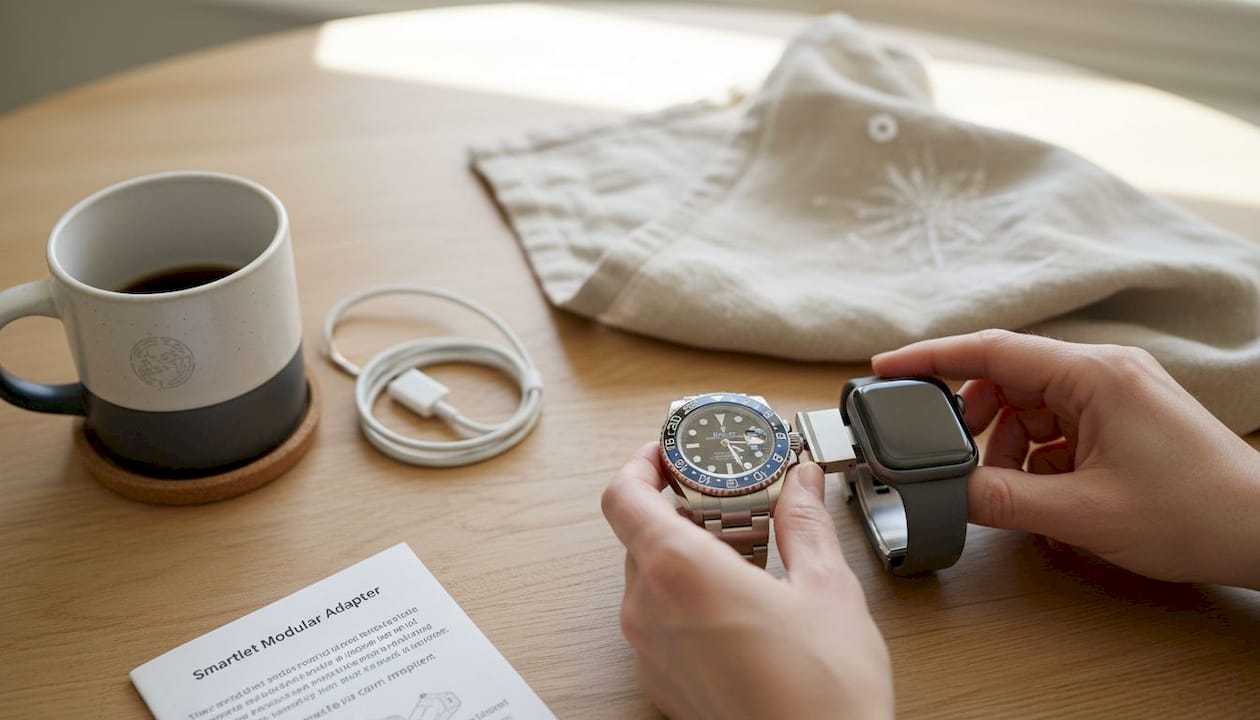
The Smartlet holds your smartwatch underneath, below your mechanical watch, keeping the optical heart rate, ECG and SpO2 sensors in full skin contact, while notifications and all other smartwatch functions continue to operate normally. The Smartlet compatibility guide for Rolex confirms fitment for the GMT-Master II with no modification required.
Advantages of the stacked setup:
- Both time zones visible at a glance Both time zones are visible at a glance without opening any application or pressing any button.
- Full health data continuity Full health data continuity is maintained because the smartwatch sensors remain in direct contact with your skin throughout.
- No wrist switching No wrist switching required, which eliminates the habit of moving your smartwatch to the other arm.
- Collector-grade aesthetics The mechanical watch remains the visual centerpiece, with collector-grade aesthetics as the main focus.
- Conversation value Conversation value at client dinners, airport lounges, and watch events comes naturally with this setup.
For a steel-braceleted GMT, the Classic (299 EUR) or Shadow (399 EUR) Smartlet creates a cohesive look. For a titanium sports watch, the Titanium (549 EUR) keeps weight down and finish coherent. All three versions share identical dimensions and the same spring bar attachment system.
Quick reference: The dual time zone setup process
Here is the complete process from preparation to travel-ready:
- Set your GMT hand before departure. Set your GMT hand to origin time before departure. Confirm it against a known world clock. Do not touch it again during the trip.
- Enable auto time zone on your smartwatch. Confirm that your smartwatch automatically updates to the correct time zone. On Apple Watch, verify Set Automatically is on via iPhone. On Samsung, open Galaxy Wearable and confirm sync settings are active.
- Add a World Clock complication or widget Add a World Clock complication or widget to your smartwatch face listing your origin city and your destination. It gives you instant access to both without unlocking your phone.
- Check the date on your GMT watch Check the date on your GMT watch before 9PM local time. If it needs adjustment, do it then. Never adjust between 9PM and 3AM.
- Attach both watches to the Smartlet. Confirm the smartwatch sensors are flush against your wrist before boarding.
- Test both time zones Test both time zones by comparing your GMT hand reading against a known world clock before boarding.
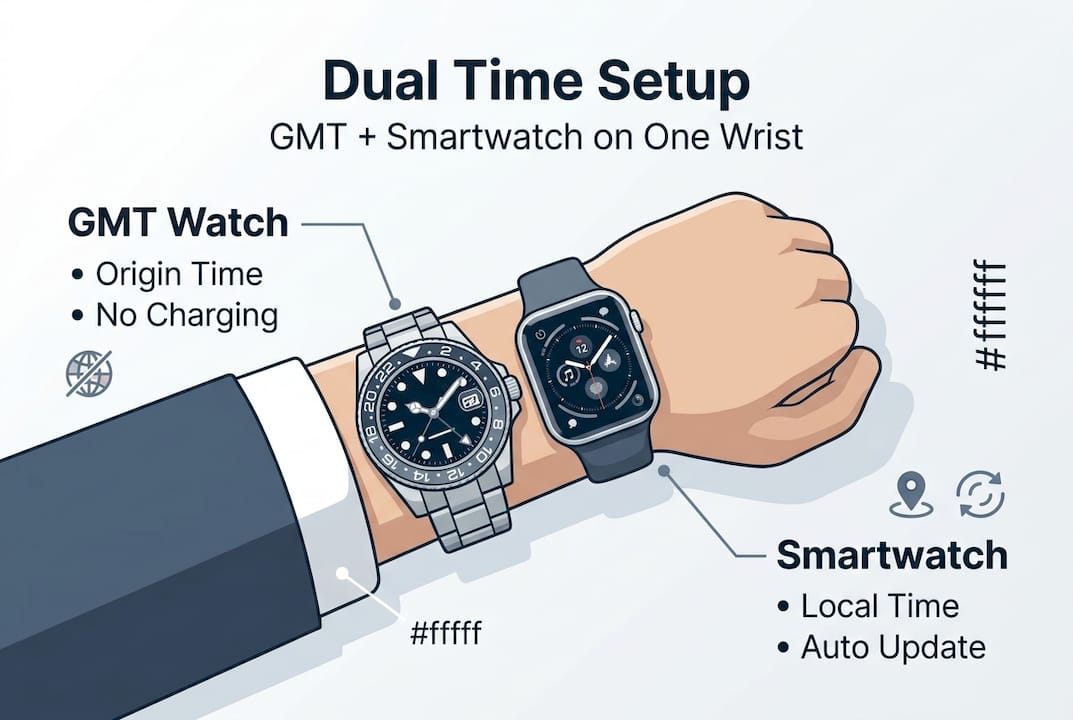
- On arrival, your smartwatch updates automatically. Your GMT hand stays fixed. You have both times without touching either watch.
- For return travel On return, your smartwatch updates automatically to your home time zone. Your GMT hand already shows it. You have both times without touching either watch.
The GMT holds origin time as a fixed reference. The smartwatch displays dynamic local time. That division of roles is what makes the system reliable rather than redundant.
Why the dual-watch method beats digital-only travel timekeeping
Most travelers default to their phone for time zone management. It works until it does not. A dead battery, a locked screen, or a distracted moment in a meeting and the reference is gone. A mechanical GMT watch has no battery to die and no screen to lock. It is always readable, always accurate to the last time you set it.
The hybrid setup also carries something digital-only solutions cannot replicate: presence. Walking into a client meeting with a GMT-Master II and a connected watch stacked on your wrist signals precision and intentionality. It is a subtle but real advantage in high-stakes environments.
There is also a resilience argument. True GMT versus Caller GMT functionality means different users in the same organization can each optimize their watch for their role without conflict. The traveler keeps home time fixed. The office contact tracks the traveler's local time. Both are right.
The watches that hold their value longest are the ones that solve a real problem every single day. A GMT paired with a smartwatch via the Smartlet system does exactly that.
A mechanical GMT, maintained properly, outlasts any smartwatch generation by decades. The Smartlet moves with you across smartwatch upgrades, preserving the mechanical investment while keeping you current on connected features.
Take your travel timekeeping further with Smartlet
The Smartlet modular strap is available in three versions: Classic (299 EUR), Shadow (399 EUR), and Titanium (549 EUR), each engineered to pair your mechanical GMT with your connected watch without compromise. It is patented in the EU, US, and Japan and won the Bronze Medal at the Concours Lepine 2025.
Start with the compatibility guide to confirm your watch model fits, then explore Smartlet accessories to complete your setup. Whether you are pairing a GMT-Master II with an Apple Watch or a Breitling GMT with a connected watch, the system is designed to work precisely for your wrist. compatibility guide to confirm your watch model fits, then explore Smartlet accessories to complete your setup. Whether you are pairing a GMT-Master II with an Apple Watch or a Breitling GMT with a connected watch, Smartlet is designed to work precisely for your wrist.


